





Logitech M185 Review 2026 shows why this budget wireless mouse is still one of the most popular choices for office users and students. As told by Logitech M185, I tested it for several weeks to see whether it still delivers reliable performance in 2026.
So the real question is simple:
Why is a basic USB receiver mouse still dominating a feature-rich market in 2026?
To find out, I used the Logitech M185 as my daily driver for several weeks—handling writing work, browsing, office tasks, and general productivity. This review is based entirely on real-world experience, not just specifications.
If you are wondering whether it is still worth buying, this detailed review will give you a clear answer.
Logitech M185 Design and Comfort
This surprised me was how quickly I stopped noticing the mouse altogether. Within few it simply became use to of it for my workflow. I never found myself adjusting my grip or feeling uncomfortable during long writing sessions thats not everything I say about it.This is best low budget mouse i have ever used.
The build quality is what you would expect from Logitech’s budget friendly mouse. The plastic construction feels durable enough for daily use and despite being affordable it doesn’t feel fragile or cheaply assembled.
Logitech M185 Battery Life Test & Real Usage Results
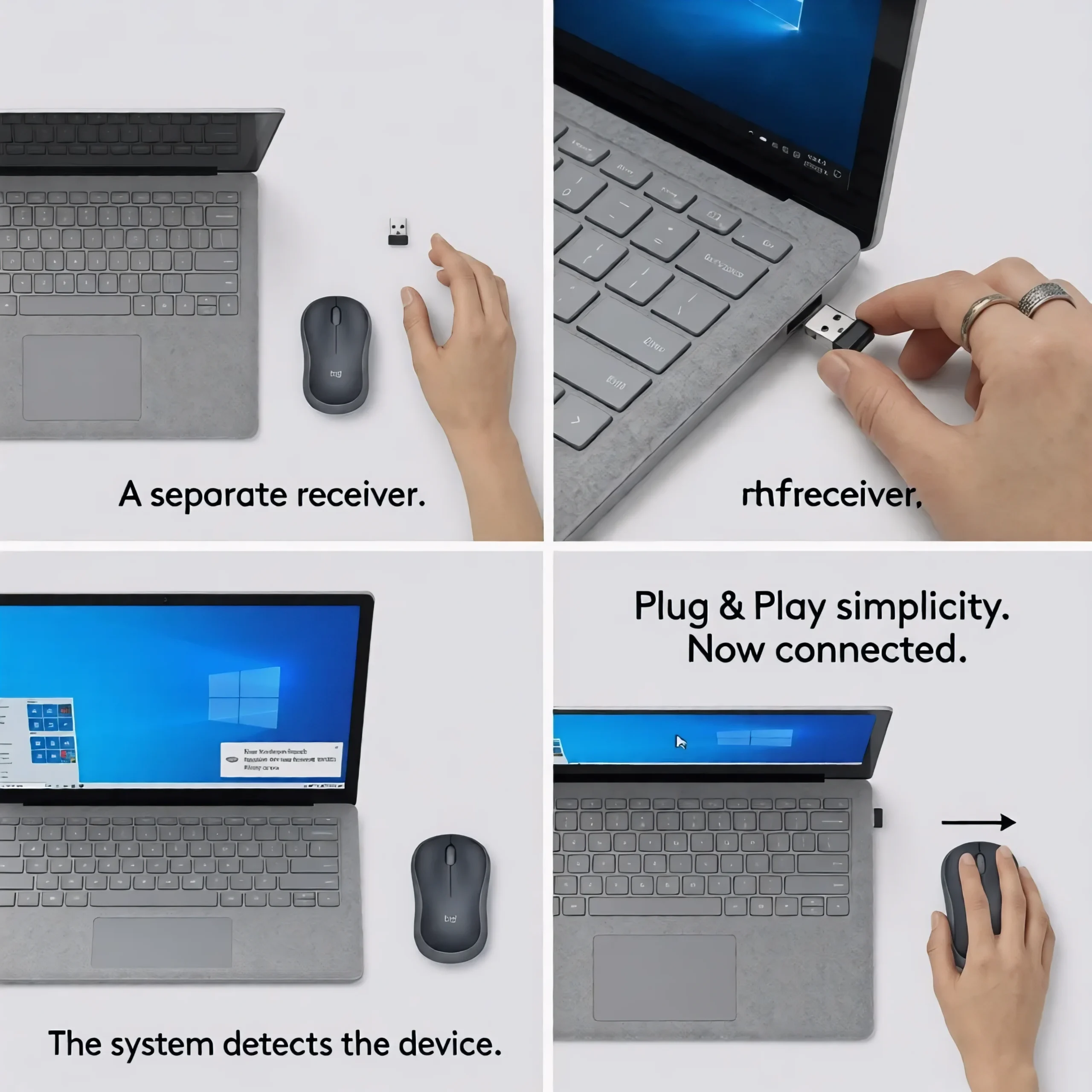
Plug-and-Play Setup
One of the biggest reasons people continue to buy the Logitech M185 is how easy it is to set up.
Unlike many modern wireless peripherals that require software installation, account creation, firmware updates, or Bluetooth pairing, the M185 works almost instantly.
I simply plugged the nano USB receiver into my laptop, switched on the mouse, and it was ready to use within seconds. There were no drivers to install and no settings to configure.
For students, office workers, and less technical users this plug-and-play simplicity is a major advantage.
Tracking & Wireless Stability
The Logitech M185 uses a 1000 DPI optical sensor and a 2.4GHz wireless connection through its nano receiver.
During two weeks of use on both a wooden desk and a standard mousepad, I never experienced unexpected cursor jumps or major tracking issues. Most of my work involves writing, researching, and switching between dozens of browser tabs. During that time, I never noticed sudden cursor jumps or random disconnects. The mouse wasn’t doing anything impressive it was simply doing its job consistently, which is exactly what I want from an office mouse.
Click Feel & Scroll Wheel
The primary buttons gives a firm and tactile click response. The clicks are not silent, but they provide satisfying feedback that makes each action feel deliberate.
Users working in extremely quiet environments may prefer silent click mouse but for most office and home users the click sound is not either a problem.
The scroll wheel uses traditional ratchet-style scrolling. It feels precise when navigating documents spreadsheets and websites. While it lacks the ultra smooth scrolling found on premium productivity mouses it performs consistently and never feels unreliable.
Battery Life: Does Logitech’s 12-Month Claim Hold Up?
Battery life remains one of the strongest reasons people continue to choose the Logitech M185 over newer alternatives.according to logitech
Since I only used the mouse for a few weeks I obviously could not verify the full 12 month battery claim until now. But one thing i noticed is there are no battery-related issues during testing and based on Logitech long track record with power efficient devices this mouse feels good for typical office use.
Compatibility & Device Support
Another reason for the M185’s long-term popularity is its broad compatibility.
The mouse works seamlessly with Windows PCs, macOS devices, Linux systems, and ChromeOS computers. Because it relies on a USB receiver rather than Bluetooth, setup is typically straightforward and reliable across different platforms.
I tested it on both a Windows laptop and a desktop PC, and it functioned immediately without any compatibility issues.
The only limitation is that newer ultrabooks and MacBooks without USB-A ports will require a USB-C adapter to connect the receiver.
Limitations You Should Know Before Buying
The biggest thing I missed was Bluetooth connectivity. In 2026 many affordable mouse allow you to switch between devices without occupying a USB port. The M185 still relies entirely on its receiver which feels slightly outdated today but still not that much old.
Logitech M185 vs Modern Wireless Mice
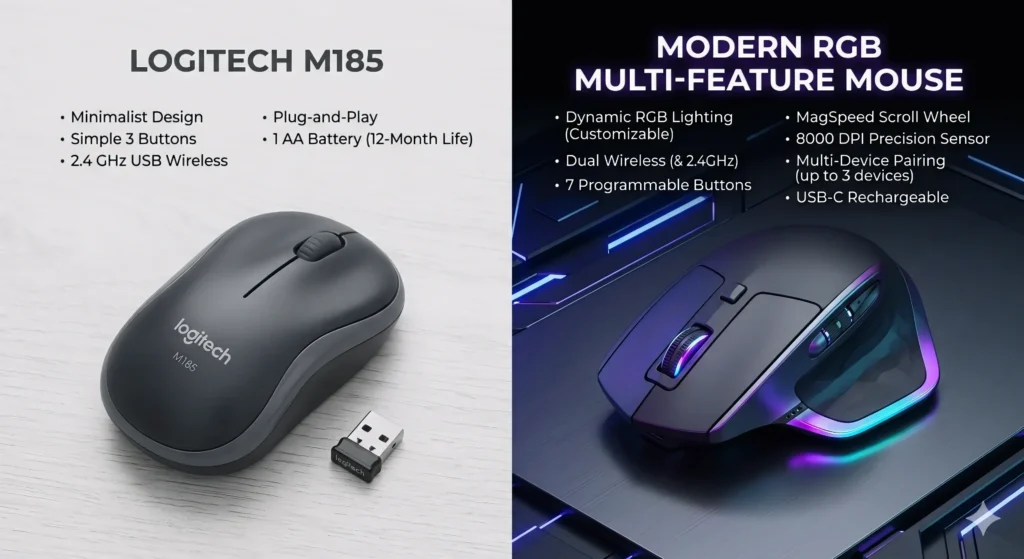
If you compare the logitech M185 with new high budget mouses you will quickly find out that that it loses on paper. Many competitors now offer Bluetooth and silent clicks for only a little more money. However many of those models also introduce some extra features. The M185 wins because it remains incredibly simple to use.
If your goal is maximum productivity with minimum maintenance the M185 remains surprisingly competitive.
Pros and Cons
Pros
- Reliable 2.4GHz wireless connection
- True plug-and-play setup
- Excellent battery life
- Lightweight and portable
- Comfortable ambidextrous design
- Affordable price point
- Broad operating system compatibility
Cons
- No Bluetooth connectivity
- Fixed 1000 DPI sensor
- Audible button clicks
- Requires a USB-A receiver
- Not suitable for competitive gaming
Who Should Buy the Logitech M185?
The Logitech M185 is ideal mouse for students office workers remote employees and anyone looking for a everyday use wireless mouse without unnecessary specs.
It is especially useful for users who prioritize long battery life like this Lightweight device Anker prime 67w GaN charger which improve daily workflow efficiency.
However gamers, graphic designers and users who require high precision and customized mouse should look for more advanced alternatives.
Final Verdict: Is Logitech M185 Worth It in 2026?
After several weeks of use I do not think the Logitech M185 is the best wireless mouse for everyone. But I do think it is one of the safest purchases for students office workers and anyone who simply wants a decent mouse without spending too much money. It is the best logitech mouse for regular use.
If you are looking for Bluetooth silent clicks or gaming performance there are better options available. If you want a mouse that works every day like mouse that most of people want without demanding high price heavy mouse the M185 is still surprisingly hard to beat.
Frequently Asked Questions
Is the Logitech M185 good for office work?
Yes. It is reliable wireless and comfortable mouse .On the other hand the plug and play setup make it an excellent choice for office productivity.
How long does the battery actually last?
Under average daily use a single AA battery can last up to 12 months thanks to the mouse power saving features.
Can I use the Logitech M185 for gaming?
It is perfect for gamers having Low end Pc but it is not designed for competitive gaming or esports due to its fixed 1000 DPI sensor and basic features. It is good for basic games like gta and minecraft but not for counter strike or call of duty and pubg.
Does the Logitech M185 support Bluetooth?
No it does not support bluetooth but it connects exclusively through its included 2.4GHz USB nano receiver.
